| img | ||
| src | ||
| install | ||
| LICENSE | ||
| README.md | ||

Comfortable Swipe (Ubuntu)

Comfortable 3-finger (and 4-finger) swipe gestures for Ubuntu 14.04 LTS+
(c) Rico Tiongson
Installation
sudo apt install libinput-tools libinput-dev libxdo-devgit clone https://github.com/Hikari9/comfortable-swipe-ubuntu.gitcd comfortable-swipe-ubuntu- Tweak
src/comfortable-swipe.cppto fit keyboard shortcuts of your gestures bash install
How to Run
comfortable-swipe start- Flick away!
Permissions
Sometimes, you'll need some permissions to read touchpad input data. Perform these steps to solve the permission issue:
sudo gpasswd -a $USER input- Log out / log back in
Optional: Add to Startup Applications
-
gnome-session-properties -
Add, then enter:
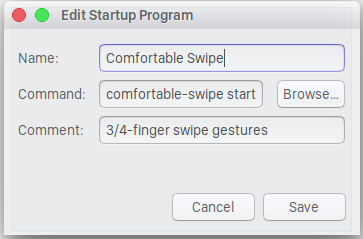
-
Save
Configurations
The configuration file is located at ~/.config/comfortable-swipe.conf.
Make sure to run comfortable-swipe restart after making changes.
| Property | Description | Default Value | Default Behavior |
|---|---|---|---|
| left3 | 3-finger swipe left | ctrl+shift+Right | switch to right workspace |
| right3 | 3-finger swipe right | ctrl+shift+Left | switch to left workspace |
| up3 | 3-finger swipe up | super+w | window spread |
| down3 | 3-finger swipe down | super+w | window spread |
| left4 | 4-finger swipe left | ctrl+alt+shift+Right | move window to right workspace |
| right4 | 4-finger swipe right | ctrl+alt+shift+Left | move window to left workspace |
| up4 | 4-finger swipe up | super+d | show desktop |
| down4 | 4-finger swipe down | super+d | show desktop |
| threshold | mouse pixels to activate swipe; higher = less sensitive; integers only | 20 |
Bug Reports
Create an issue here to report a bug.