|
|
||
|---|---|---|
| img | ||
| src | ||
| install | ||
| LICENSE | ||
| README.md | ||

Ubuntu-Comfortable-3-Finger-Swipe
Author: Rico Tiongson
Comfortable 3-finger and 4-finger swipe gestures. Uses Xdotool in native C++. For Ubuntu 14.04 LTS and beyond.
Installation
sudo apt install libinput-tools libinput-dev libxdo-devgit clone https://github.com/Hikari9/Ubuntu-Comfortable-3-Finger-Swipe.gitcd Ubuntu-Comfortable-3-Finger-Swipe- Tweak
src/comfortable-swipe.cppto fit keyboard shortcuts of your gestures bash install
How to Run
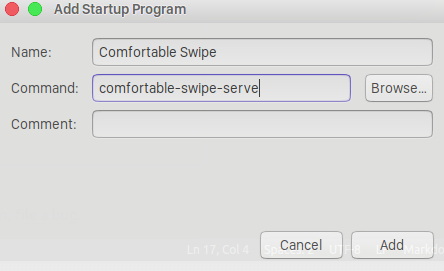
comfortable-swipe-serve- Flick away!
Optional: Add to Startup Applications
gnome-session-properties- Click
Add